|
| | Lets invert the matrix: |  |
|
| |
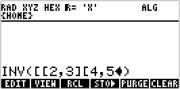
1- Press 1/X or type
INV ( [ 2 , 3 ] [ 4 , 5 ] )
 |
| |
|
|
| 2- Press [ ENTER ] |
| |
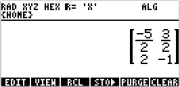
3- it will show the inverse matrix
 |
| |
Remember the "," between numbers.
Here coma is used as separator, not as fraction mark.
HP49G uses "." as fraction mark, according to the
default flag.
|
|